Step 1: Find the ATHLETES tab within your Scoring Control
Step 2: This brings you to the Invite Athletes to Meet page. You will see a handful of drop downs. Find the drop down that says SELECT A CLUB. Find the club you are looking for within this list.
**note: there are a lot of clubs, if you start to type the first few letters it will bring up those clubs that match.
Step 3:
- A. If that club already has athletes, they will populate in a list. You will select the check boxes of the athletes who are coming to the meet, then click the ADD button. Follow this step with all of the clubs until you have invited them all. These athletes will go in to the default session, division, and squad unless specified. No worries, you can easily organize this after the athletes are added.
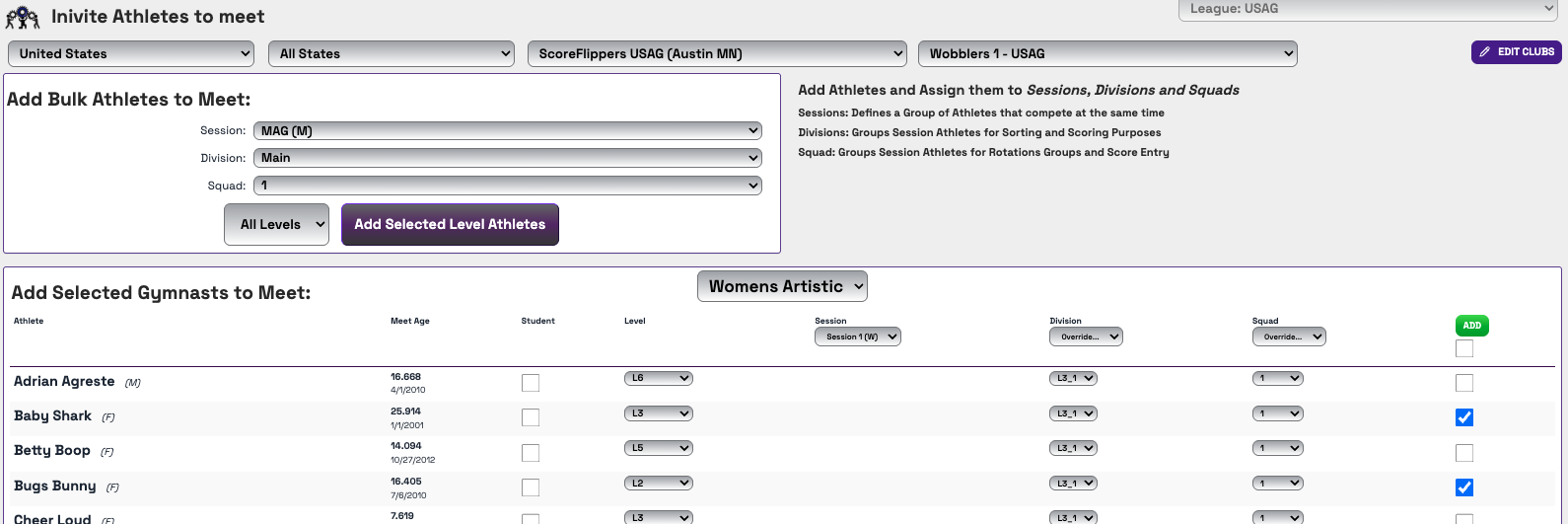
- B. If that club is missing athletes you will need to add them. Click EDIT CLUBS.
- You can IMPORT TEAM ROSTER - or -
- You can select CREATE NEW ATHLETE
- C. If you already have your Sessions, Divisions, and Squad names created you can use the ADD BULK ATHLETES TO MEET feature. You will still select the club you want to add from the drop down. Within the Add Bulk Athletes to Meet box, you will select the Session drop down, division drop down and squad drop down - the pick what Level from that club you want to go into that group.

Was this article helpful?
That’s Great!
Thank you for your feedback
Sorry! We couldn't be helpful
Thank you for your feedback
Feedback sent
We appreciate your effort and will try to fix the article