The Search Tool in your meet scoring control is at the top center of the screen. (this will not be on the score entry page, only within the main control).
Step 1: Click SEARCH and find your athlete by typing a name or filtering through the columns.
Step 2: Click the plus button next to the athlete you need to look up or edit.
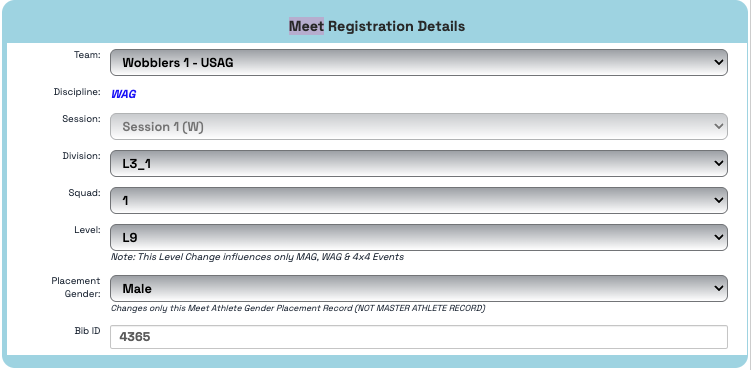
- Meet Registration Details quick edits:
- Team
- Division
- Squad
- Meet Placement Level
- Placement Gender
- Bib ID
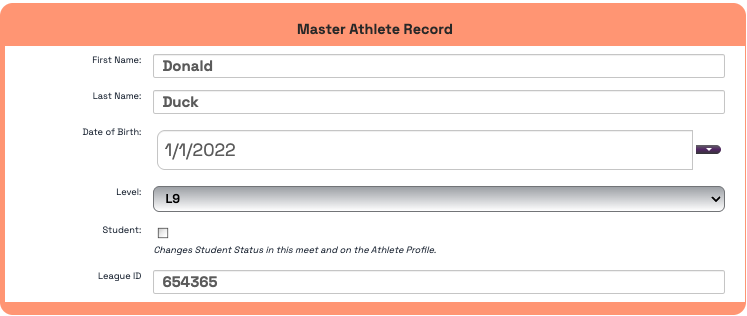
- Master Athlete Record quick edits:
- First Name
- Last Name
- DOB
- Master Record Level
- Student Status
- League ID
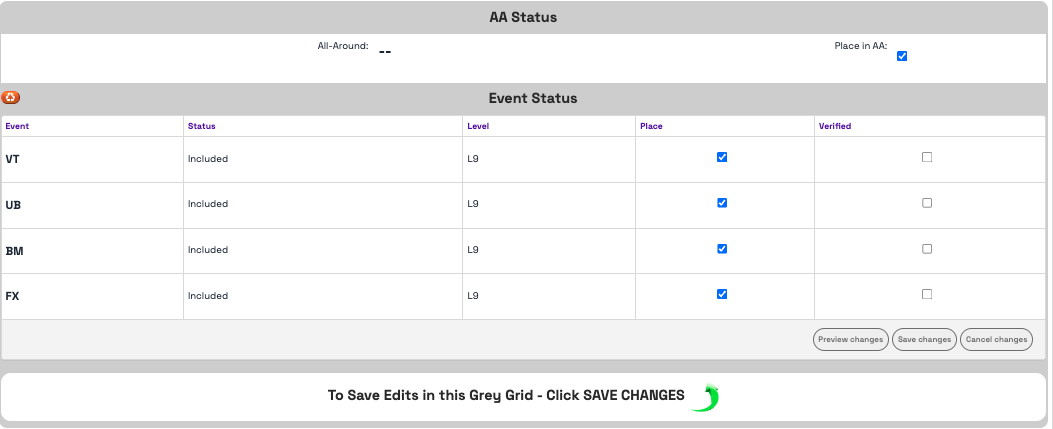
- AA & Event Status
- Status - double click in the box to change from Included, Scratch, Excluded
- Level - double click the box to change the event level
- Place - uncheck the box if they cannot place on that event
- Verified - check or uncheck the box for score verification
**make sure to click SAVE CHANGES
Was this article helpful?
That’s Great!
Thank you for your feedback
Sorry! We couldn't be helpful
Thank you for your feedback
Feedback sent
We appreciate your effort and will try to fix the article