Configure Score Entry
One-Judge vs. Two-Judge Mode: In Edit Settings under Score Entry Settings, choose how many judges will be scoring each event:
One-Judge Mode: A single score is entered per event. Simple, but offers no automatic error-checking on averages.
Two-Judge Mode: Both judges enter their individual scores. The system automatically calculates the average, eliminating the risk of human averaging errors that can affect qualifying scores.
? Best Practice: Always use Two-Judge Mode when two judges are present and have each judge enter their own score. This is the safest approach; the system does the math, and there is no risk of a miscalculated average slipping through unnoticed.

Vault Attempt Configuration: Set the number of vault attempts that need to be recorded per athlete. Once configured, judges' tablets will prompt for the correct number of scores automatically; no guesswork at the table.
- 1 vault attempt: Standard for most competitive levels
- 2 vault attempts: Used when both vaults are scored and the best is taken.
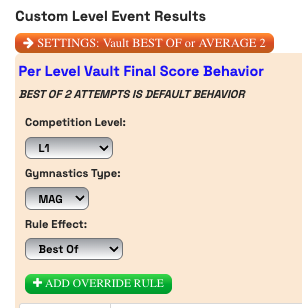
- Per Level Vault Final Score Behavior: Set the drop downs per level to add vault scores as "best of" or "average of"
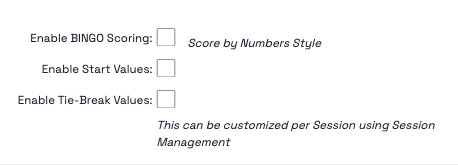
Bingo Scoring Mode - If you have judges or volunteers who are not comfortable using an unfamiliar digital interface, Bingo Scoring Mode is your solution:
- Activate it in Score Entry Settings
- The entry screen transforms to closely resemble the Pro Score layout, a familiar interface for experienced gymnastics judges
- Each judge can independently choose their preferred entry mode; one judge can use standard mode while another uses bingo scoring
- Both entry styles feed into the same system seamlessly
? Tip: Introduce bingo scoring mode to hesitant judges before meet day so they have a chance to get comfortable with it. A quick 5-minute walkthrough goes a long way.
Was this article helpful?
That’s Great!
Thank you for your feedback
Sorry! We couldn't be helpful
Thank you for your feedback
Feedback sent
We appreciate your effort and will try to fix the article