Step 1: Setting Up Your Meet
- Did you use ScoreFlippers EVENTS for registration?YES
(continue with these instructions)
NO
Congratulations and thank you for using ScoreFlippers EVENTS!!!!
Step 2: Go to scoreflippers.com, login, select the 9 dot menu and click EVENTS.
Step 3: Look at the top menu bar, select the EVENTS drop down and click MY HOSTED EVENTS.
Step 4: Select the EDIT icon next the your meet.
Step 5: Click EVENT ADMIN
Step 6: On the left menu, select EVENTS TO SCORING
Step 7: Click LINK EVENTS TO SCORING
Step 8: You have 2 options here:
- Create Basic Meet (No AI) - this will create your meet and transfer your athletes and their information over
- Create Meet with EVENTS AI Settings
Step 9: Once you select your option, this screen will pop up. Make your Selections and click CONTINUE MEET CREATION
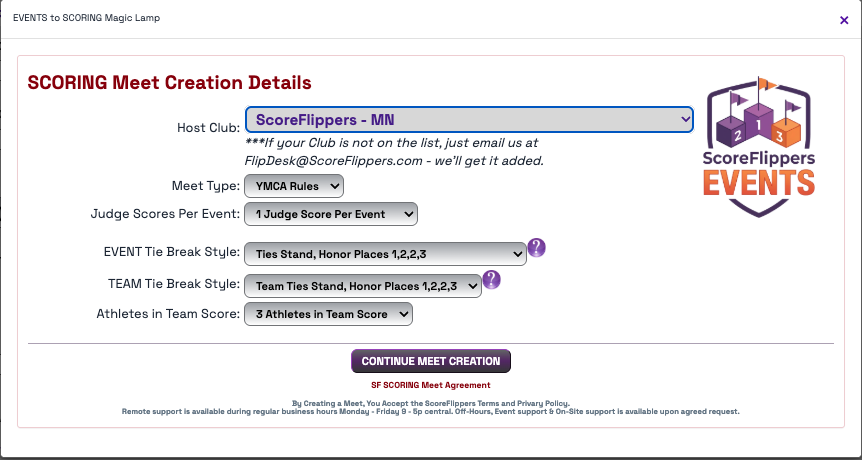
You will be able to get to your SCORING meet from this link or by going to the SCORING module and SCORING CONTROL.
Was this article helpful?
That’s Great!
Thank you for your feedback
Sorry! We couldn't be helpful
Thank you for your feedback
Feedback sent
We appreciate your effort and will try to fix the article