When you get to a screen where you can Create A New Athlete, follow these simple rules.
Step 1: Click CREATE NEW ATHLETE
Step 2: Type in the First and Last Name of the athlete. Click SEARCH FOR ATHLETE.
Step 3: You will notice that similar names to the one you typed will appear. If you see one that you think might be your athlete you can click the circle next to the athlete name to see more information. This will show you any other association and team they have been part of.
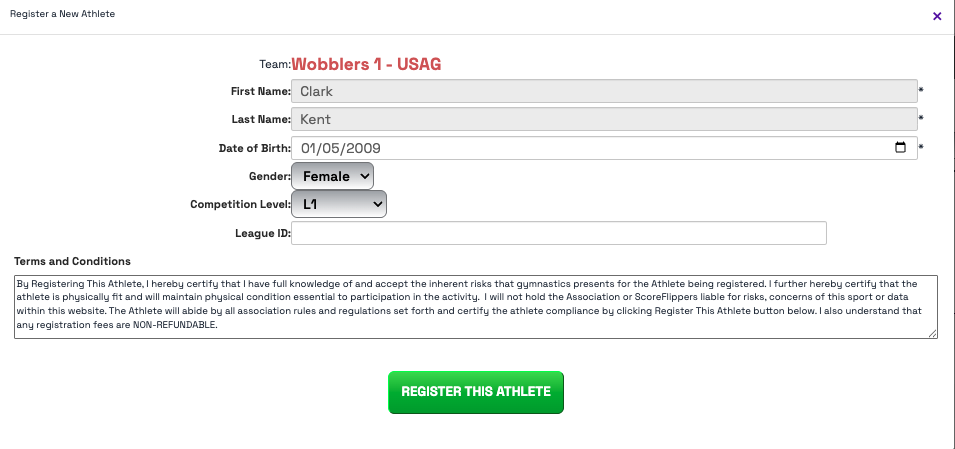
- If this is your athlete, then click I FOUND AND SELECTED MY ATHLETE TO REGISTER. This will bring up an information box about them, you can update or accept that information. Click REGISTER THIS ATHLETE.
- If this is not your athlete and you do not see a match, you can click NO ATHLETE MATCH - REGISTER A NEW ATHLETE - this will bring up the information box about them that you will need to enter their Date of Birth, Gender, Level and League ID (if you have it). Then click REGISTER THIS ATHLETE.
 **Note: you will be surprised how many athletes already exist in the system. Even if you think they have never been on ScoreFlippers, please double check. We want your athletes to have one, super cool, athlete profile!
Was this article helpful?
That’s Great!
Thank you for your feedback
Sorry! We couldn't be helpful
Thank you for your feedback
Feedback sent
We appreciate your effort and will try to fix the article