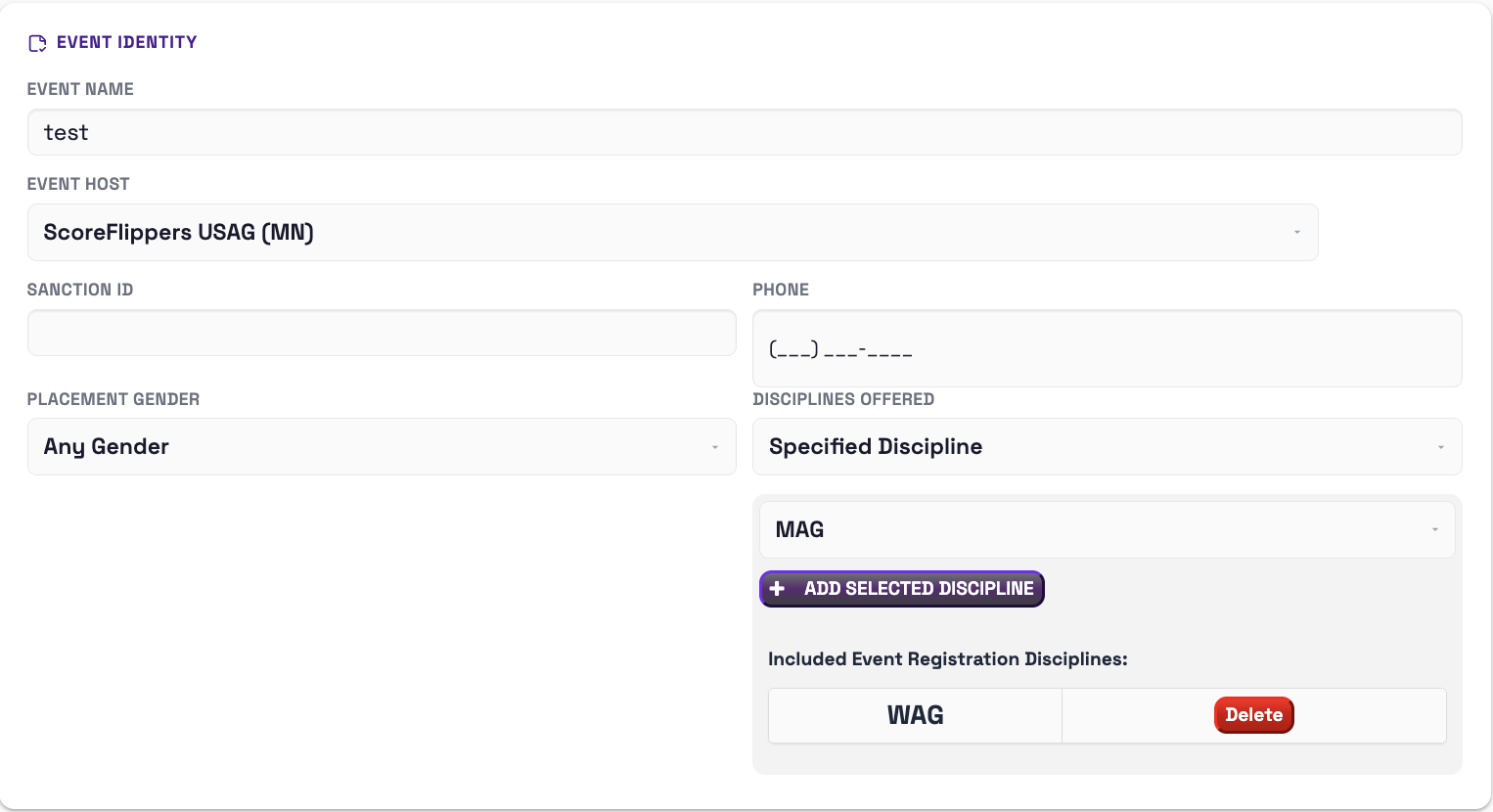
EVENT IDENTITY -
- Event name
- Event Host - select the host club from the drop down
- Sanction ID #
- Phone Number
- Placement Gender
- Specified Discipline - click ADD SELECTED DISCIPLINE button to add WAG, MAG or T&T.
LOCATION -
- Add Venue name and address.
DATES & DEADLINES -
- Event Start Date --> Event End Date
- Registration Open Date
- Late Registration Date (on this date, the price will go up according to the Late Registration amount that was set.
- Registration Close Date
- Last Day to Edit Entries - coaches will be allowed to make edits to their own entries until this date. (Edit names, levels, scratches, etc.)
- Last Day to Buy Extras - below you will be able to set EXTRAS for purchase if any.
- Age Calculation Date
- Override Options
- Disable Athlete Registrations (ex, you don't want athletes to register, but you want coaches to be able to register.)
- Disable Coach Registration
VISIBILITY -
- Public Visibility - everyone can see
- Private Visibility - No one can see on public page, you must send out the private link to invitees
- Upload your Event Logo Here
EVENT EXTRAS -
- Add event extra items for purchase (ex: clothing, food, special event)

VENUE & LOGISTICS -
- Registration limit - set a limit to the amount of athletes you want to be able to register for your event.
- Online Summary - visible to registrants on the event page
- Changes & Corrections Policy - describe
- Refund Details - describe
MESSAGING -
- Email Receipt Message
- Coach Note - note displayed to coaches during registration
COMPETITION INFO -
- Competition Format
- Admissions
- Competition Level Notes
- Awards
- Athlete Gift
- Event Website
DIRECTORS -
- Name & email of up to two directors
- Check the box if you want to receive emails for each registration
WHO CAN REGISTER -
- Club Managers
- Can register Athletes / Teams
- Can register Coaches
- Athletes
- Athletes with Accounts can Register Themselves
- Non-Club Manager Access (ex: parents)
- Athletes
- Teams
- Coaches
- Non-Membership Participants
TEAM REGISTRATION -
- Turn on or off the ability for teams to register
- Registration Type
- Manually Add to Cart - rely on coaches registering and paying for teams.
- Auto-Add to Cart - teams will automatically be added to the customer cart. The system is smart enough to count previous registrations and count total number of athletes per level. **Note, this makes signing up and paying for teams mandatory.
PAYMENT SETTINGS
LEVELS & PRICING
LEVEL MANAGEMENT
Was this article helpful?
That’s Great!
Thank you for your feedback
Sorry! We couldn't be helpful
Thank you for your feedback
Feedback sent
We appreciate your effort and will try to fix the article